
Mobile browser
No installation needed, always opens the latest version and takes up no storage space.

Browser, home-screen shortcut and desktop app options on your phone or computer, the setup steps and what to keep in mind in everyday use, all in one place.
* reported values; they may change from period to period
Installing a separate app to play on your phone is not always necessary. The platform's HTML5-based mobile site works in both Android and iOS browsers; the casino lobby, sports betting, the cashier and live support can all be used on the mobile screen with the same account. According to the reported information, there is also a desktop app for Windows and macOS. Whether native Android and iOS apps exist is less clear: an app that sends push notifications has been reported, but it has also been reported that there is no official mobile app and that adding a shortcut to the home screen is the recommended route.
For this reason, users searching for "starzbet apk" or "starzbet app download" should first check for a download link only on the official site, not in search results. If the official site has a download section, the file there can be used; if not, the mobile site and a home-screen shortcut do the same job. Files circulating under the Starzbet app name that are not linked to the official site may be fake software designed to steal account credentials.
No installation needed, always opens the latest version and takes up no storage space.
Opens the site full screen like an app; created with Chrome on Android and Safari on iPhone.
The reported desktop app runs as a separate window on your computer.
Files shared outside the official site should not be installed; always check the permission list and the source.
Links distributed through messaging apps require the same caution. Although "starzbet whatsapp" is a frequent search, an official WhatsApp line has not been confirmed; this topic is covered separately in the troubleshooting section below.
A PWA (Progressive Web App) is a way of adding a website to the home screen so that it opens like an app. Once the shortcut is created, the site opens full screen without an address bar, its icon appears alongside your other apps and the current version is loaded from the server every time it opens. This means there is no need to wait for an app store update.
| Feature | Mobile browser | Home-screen shortcut (PWA) |
|---|---|---|
| Installation | Not needed | Added in a few taps |
| Storage space | Browser cache only | Very small; takes up no space beyond the cache |
| Updates | Automatic | Automatic, latest version on every launch |
| Screen use | Address bar visible | Full screen, app-style view |
| Address check | Visible on every launch | Stays fixed if the shortcut was created from the correct address |
| Domain change | Type in the new address | The shortcut has to be recreated with the new address |
In practice, the difference between the two methods is one of comfort; the game library, cashier and account settings are the same. The browser makes checking the domain easier because the address bar is always visible. The shortcut, on the other hand, opens with a single tap and uses the screen more efficiently. When the domain changes from time to time, an old shortcut may stop opening; in that case, delete it and create it again from the current address. With Starzbet mobile access, the login details are the same for both methods, and anything done on one device also appears on the other.
For someone who uses their phone occasionally and only checks a few matches, the browser is enough. Users who log in every day from the same device save time with a home-screen shortcut. Users who type "starzbet app log in" into a search engine reach the same login screen with either method: whichever way it is opened, the login window shows the same account and the same balance. If you use more than one device, you log in separately on each; closing sessions on devices you no longer use is a simple but effective habit for account security.
On Android devices there are two options: installing the APK file if it is offered on the official site, or creating a home-screen shortcut via Chrome. Menu names can vary slightly depending on the Android version; the steps below describe the general flow.
Confirm the current domain through the official Telegram channel or X account (@starzbetcom) and open the site in Chrome on your Android device.
Look for an app download section in the site's menu or footer; an APK file should only be downloaded from the official site, and only if it is offered there.
If an APK is offered, go to Settings > Apps > Special access > Install unknown apps and allow Chrome only.
Tap the downloaded file, read each requested permission and complete the installation; do not install a file that asks for access to your contacts or SMS.
As soon as installation is complete, turn off permission to install from unknown sources again.
If no APK is offered on the official site, pin the site to your home screen using Add to Home screen or Install app in the Chrome menu.
Open the site from the icon on your home screen and sign in with your username and password.
The most important check during an APK installation is the source of the file. A "starzbet apk" file shared outside the official site, in a social media message, on a forum or in a messaging group may have been modified. If an app asks for access to your contacts, SMS, call log or accessibility features during installation, it is requesting permissions a casino interface does not need, and the installation should be cancelled. Google Play Protect scanning should be left on, and the app's permissions should be reviewed once more in the Settings menu after installation.
In general, apps cannot be installed on an iPhone or iPad from outside the App Store. Since an official app in the App Store has not been confirmed, the recommended route for iOS users is Safari's "Ana Ekrana Ekle" (Add to Home Screen) feature. The icon created this way opens the site full screen like an app.
Open the official address in Safari, as adding to the home screen works most smoothly there.
Check that the domain in the address bar is the same as the address announced in the official channels.
Press the Share button with the square-and-arrow icon at the bottom of the screen.
Scroll down the list that opens and tap Add to Home Screen.
Change the shortcut's name if you wish and press the Add button in the top right.
Tap the new icon on your home screen; the site opens full screen, then sign in with your credentials.
If an app resembling the brand name appears in the App Store, check the publisher's name and whether the app is linked to the official site; not every app that uses the brand name is official. Pages that ask you to install a profile or configuration file should never be approved, as these files can grant wide-ranging permissions on the device. Keep in mind that when using a home-screen shortcut on iOS, clearing Safari's cache may log you out; in that case, simply tap the icon and log in again. If the old icon stops opening after a domain change, delete it and repeat the steps above with the current address. Setting a daily usage limit for the shortcut in the Screen Time menu is also a practical responsible gaming tool for iPhone users. Keeping the 'Fraudulent Website Warning' option switched on in Safari's settings after adding the shortcut provides an extra layer of protection.
The mobile interface keeps the dark navy tones of the desktop site and is arranged for one-handed use. Game categories are shown as horizontally scrolling tabs, and providers and games are searched via the search field at the top. Slots, live casino tables and the platform's own games (such as Plinko, Dice and Hilo) open in a vertically scrolling list.
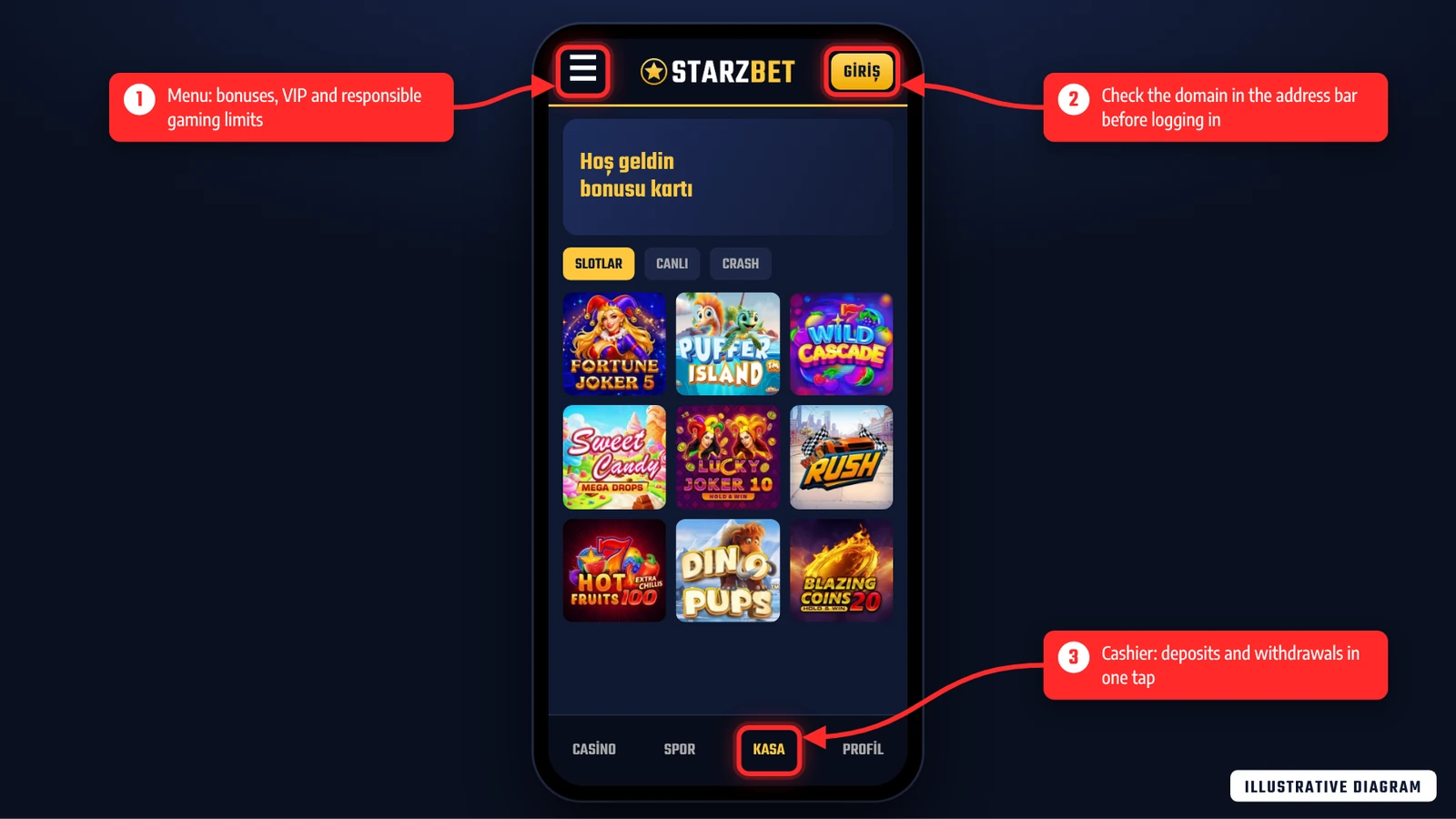
The diagram above shows three key points of the mobile interface. (1) The menu in the top left; sections such as bonuses, account settings and responsible gaming limits are reached from here, and users who want to set a deposit or loss limit also use this menu. (2) The login button; before typing in your credentials, check that the domain in the address bar matches the address in the official announcement. (3) The cashier tab in the bottom menu; deposits, withdrawals and transaction history open from here with a single tap.
Users searching for the login screen with English queries such as "starzbet app log in" are in fact trying to reach this login button. The login details are the same on the mobile site, the home-screen shortcut and the desktop app. The menu structure is reportedly similar in the desktop version known as the Starzbet app; users searching for "starzbet app download" should again check for the download link only within the official site. The live support bubble is usually in the bottom right corner of the screen; reportedly, support on account-specific matters is given to logged-in users. The chat window on the official site and the official Telegram account stand out as support channels, while numbers found by searching "starzbet whatsapp" should not be used without confirming them through the official channels.
In live betting, odds change within seconds, so the stability of your mobile connection directly affects whether a bet slip is accepted. The sports section reportedly offers pre-match and live betting as well as a separate esports tab. Descriptions differ on live match streaming; if streaming is offered, it usually appears on the match page with a watch icon, and if not, matches are followed via the score and statistics screen.
Setting budget and time limits in advance when betting live on mobile helps avoid snap decisions when odds move quickly. The wager and loss limits in the account menu can be used for this purpose; under the reported mechanism, lowering a limit takes effect immediately, while raising it is subject to a waiting period.
The mobile cashier offers the same payment methods as the desktop site. The methods reported for users in Turkey include Papara, bank transfer (havale/EFT), Jeton, 3D Secure credit cards and cryptocurrencies such as BTC and USDT; the current list is shown on the cashier screen. The reported minimum deposit amounts are 50 TL for Papara, 100 TL for Jeton, 150 TL for cards and 250 TL for bank transfer; as these values may change, the current limits in the cashier should be taken as the reference.
Methods reported in the cashier
Under the reported rule, the amount deposited must be wagered at least once before a withdrawal. Deposits made from mobile are also subject to this rule. Carrying out cashier transactions over mobile data or a trusted home network rather than public Wi-Fi is an extra precaution for protecting your payment details.
Mobile data usage depends largely on the content being played. Most slot games download their graphics files on first launch and use very little data on subsequent spins. Live casino tables and match streams, however, transmit video continuously and therefore use far more data. The values below are approximate ranges based on general industry averages.
| Content | Approximate data usage | Battery impact |
|---|---|---|
| Sports betting and bet slips | A few MB per hour | Low |
| Slot game | 5–30 MB on first launch, low afterwards | Medium (graphics and animation) |
| Live casino table | 300–700 MB per hour (depending on video quality) | High |
| Live match stream (if offered) | 300 MB per hour or more | High |
To save data and battery, lowering the video quality at live tables, reducing screen brightness and closing tabs left open in the background are effective. Choosing Wi-Fi for long live casino sessions both protects your data allowance and reduces connection drops. Your phone's screen time settings are also a handy tool for tracking playing time, given that the platform is reported to have no session time limit.
Most problems in mobile use are caused by the cache, an old shortcut or the connection. The table below summarises the common situations and the first fixes to try.
| Problem | Possible cause | Fix |
|---|---|---|
| Site or shortcut will not open | The domain has changed and the shortcut points to the old address | Get the current address from the official channels, delete the shortcut and create it again |
| Game will not load | Browser cache, weak connection | Clear the cache, update the browser, switch connection |
| Session keeps closing | Cookies blocked, private tab | Allow cookies for the site and use a normal tab |
| APK will not install | Installation permission is off or the file is corrupted | Download the file again only from the official site; if it is not there, use a shortcut |
| Login screen looks different | A fake page may have opened | Check the address bar and close the page without entering any details |
The "starzbet whatsapp" search is common among users looking for a number for support or the current address. However, an official WhatsApp support line has not been confirmed. The reported official channels are the 24/7 live chat on the site, email support, Telegram (@starzbetcom) and the X account (@starzbetcom). If a number contacts you on behalf of the brand, only take it into account after verifying it through live support on the official site or the official channels. Your password, SMS verification code, full card number or ID photo should never be shared via WhatsApp under any circumstances; any message asking for this information should be treated as a fraud attempt.
If these steps do not solve the problem, sharing your device model, operating system version, the browser you use and a screenshot of the error when contacting live support speeds up the solution. For users whose Starzbet app version will not open or update, uninstalling it and downloading it again from the official site is usually enough. Desktop app users who get an error on the Starzbet app log in screen can easily tell whether the problem lies with the app or the account by trying to log in via the browser with the same details.
Descriptions differ on this point. If the official site has a download section, the APK can be downloaded from there; if not, a home-screen shortcut via Chrome does the same job.
Files in search results may not be official. Downloads should only be made from the official site, and the permissions requested during installation must always be checked.
Open the official address in Safari and choose Add to Home Screen from the Share button. The icon created opens the site full screen like an app.
A desktop app for Windows and macOS has been reported. Its availability and download link should be checked on the official site.
The same username or email and password are used on the mobile site, the shortcut and the desktop app; no separate account is needed.
An official WhatsApp line has not been confirmed. Verify any numbers that contact you only through official live support or the official channels, and never share your password or codes.
Safety depends on the source of the file. Only the file offered on the official site should be used, installations that ask for unnecessary permissions should be cancelled, and the unknown sources permission should be switched off after installation.

Verified: November 5, 2026 · Operator promotion, cashier and terms pages reviewed